Launch Your
Call Center
From Your Phone
Just add your agents, upload calling lists and start dialing instantly. Scale faster with India's smart CRM & sales management platform built for growing businesses.
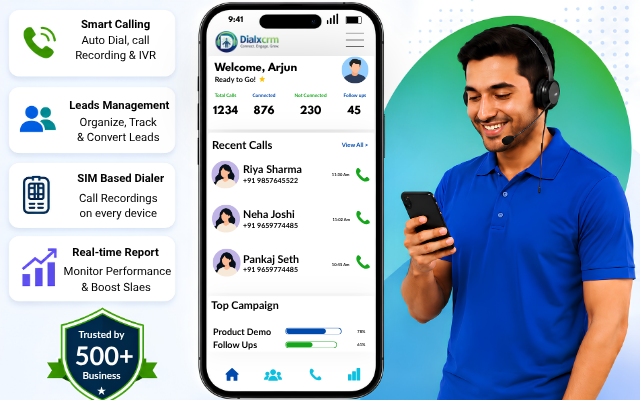
Trusted by 30+ businesses worldwide





Used by 700+ sales and telecalling teams across India and globally.
Teams report an average of 98% faster follow-up time after switching to DialX.
Over 1.2 million calls logged and recorded through the platform.
DialX stores call recordings and contact data on encrypted cloud infrastructure and is built with data-handling practices aligned to India's Digital Personal Data Protection (DPDP) Act. See our full security and compliance details
The Auto Dialer & CRM
Your Team Needs
DialX connects your lead data to an automated calling engine and a mobile app your team already knows how to use. Here's what that looks like in practice:
Leads come in
from web forms, bulk uploads, ads, or manual entry — and land in a shared pipeline.
DialX assigns and queues them
so reps always know who to call next, instead of picking leads at random.
The auto dialer places the call
directly from the app or desktop, cutting the time reps spend dialing manually.
Every call is recorded and logged
against the contact automatically, with timestamps and outcome notes.
Managers get real-time visibility
into call volume, conversion rates, and rep performance through dashboards and reports.
DialX vs Traditional CRM + Dialer Setup
Compare the difference between an all-in-one CRM platform and separate disconnected tools.
The Only SIM Based Dialer
That Can Do Call Recording
DialX is the only SIM based dialer that can do Call Recording on every device. Review conversations, improve agent performance, resolve disputes and gain valuable customer insights with unlimited recordings.
Record on
All Devices
Unlimited
Call Recordings
Download
& Share
Secure
Storage
Choose the Perfect Plan
No hidden charges. Start with any plan and upgrade anytime as your business grows.

Monthly
Perfect for getting started.
- Unlimited Calling
- Mobile CRM
- Call Recording
- Lead Distribution
- Reports & Analytics
- Priority Support
Quarterly
Best value for growing teams.
- Unlimited Calling
- Mobile CRM
- Call Recording
- Lead Distribution
- Advanced Reports
- Priority Support
Yearly
Save more with annual billing.
- Unlimited Calling
- Mobile CRM
- Call Recording
- Lead Distribution
- Advanced Reports
- Premium Support
Why Choose DialX Instead of Other Platforms?
Most general-purpose CRMs treat calling as an add-on — something you connect through a third-party integration that adds cost and complexity.
DialX was built the other way around: calling comes first, and everything else — lead management, contact history, reporting — is organized around it.
Built-in Auto Dialer
No separate plugins or complicated configurations. Start calling instantly from one platform.
Mobile-First Experience
Designed for teams who spend most of their day managing calls away from a desk.
Simple Yet Scalable
Easy for small businesses and powerful enough for enterprise sales teams and call centers.
Built for Small Businesses, Marketers, and Solopreneurs

DialX For HR

DialX For Finance

DialX For Stock Market

DialX For Automobile

DialX For Political Survey

DialX For Telemarketing
Ready to Transform Your
Telecalling Workflow?
Download the DialX mobile app today and Stop managing leads in one place and calls in another. DialX gives your sales, telecalling, and support teams one platform to dial, record, track, and close — from any device.
All the Features Your Telecalling Team Needs
Supercharge your sales process with advanced tracking, seamless calling integrations, and automated smart management.
Works Everywhere
We have android, ios, mac and windows apps. Our dashboard can be viewed on all modern browsers.
Dial Out Options
You can choose to call via sim card, line, viber, zoiper, skype and many other popular tools.
Call Recording
DialX can sync call recordings from supported devices. No need for Cloud Telephony, PRI or VOIP.
Call Tracking
Track Call Duration from device call log on Android, AI based Call Duration on iOS. Track total time spent.
What Problems Does DialX Solve?
Everyday sales and telecalling challenges solved with one powerful CRM platform.
| Common Problem | How DialX Solves It |
|---|---|
| Leads go cold because no one follows up on time | Automated reminders and pipeline stages keep every lead visible. |
| Reps waste time manually dialing numbers | Built-in auto dialer places calls directly from the CRM. |
| No record of what was actually said on a call | Automatic call recording tied to each contact. |
| Managers can't see team performance in real time | Live dashboards for call volume and conversion rates. |
| Data is scattered across spreadsheets and personal notebooks | One shared, cloud-based Customer Relationship Management Software record per contact. |
Let's Talk About Your Business Growth
Have questions about DialX ? Our team is ready to help you choose the right solution for your business.
+91 9503693555
info@techwhizzc.com
Ivory Tower, Satara Rd, Bibwewadi, Pune 411037
Customer Success Stories with DialxCRM
“DialxCRM helped us organise our leads and follow-ups properly. Our sales team now knows exactly what to work on every day.”

“The dashboard is simple and easy to understand. We get a clear view of our pipeline without spending time on manual tracking.”

“Automation features saved us a lot of time. Tasks and reminders are handled smoothly, and nothing gets missed.”

“Team collaboration improved after we started using DialxCRM. Everyone works on the same data, which reduces confusion and delays.”

Frequently Asked Questions
Find answers to common questions about DialX and see how it can transform your business workflow.
What is an Auto Dialer CRM software?
Think of it as your contact list and your phone system finally talking to each other. Instead of keeping leads in one place and dialing numbers by hand from a different app, an Auto Dialer CRM does both — it stores the contact, dials it for you, and logs what happened on the call, all in one flow.
How does DialX help sales teams close more deals?
Mostly by catching the stuff that usually slips through the cracks. DialX hands reps their next lead automatically, dials it, records the call, and pings them when a follow-up is due — so leads don't just go quiet because someone forgot to call back. Managers also get a clear view of who's calling, who's converting, and where deals are stuck.
Is DialX suitable for small businesses?
Yes — actually, that's a lot of who it's built for. You don't need an IT team or weeks of setup. If you've got a handful of people making calls and following up on leads, DialX gives you call recording, lead tracking, and reporting without the enterprise CRM price tag or complexity.
Does DialX work as a mobile CRM?
It's built mobile-first, not mobile-as-an-afterthought. A rep out in the field or a telecaller working from home can call a lead, mark it "follow up," or check today's tasks straight from their phone — and it all syncs instantly, so nothing gets lost between devices.
Can DialX record and store sales calls?
Yes, every call gets recorded and filed under that contact automatically. So if a manager wants to hear how a pitch actually went, or a rep needs to double-check what a customer agreed to, it's right there — no digging through notes or asking someone to remember.